
🖥️ Creating Routines and Jobflows via GUI
This guide explains how to define and run routines and jobflows using the platform’s visual interface. This GUI-based approach complements the code-driven method by offering an intuitive, form-based experience for designing, configuring, and launching complex workflows.
📌 Routine Creation in the GUI
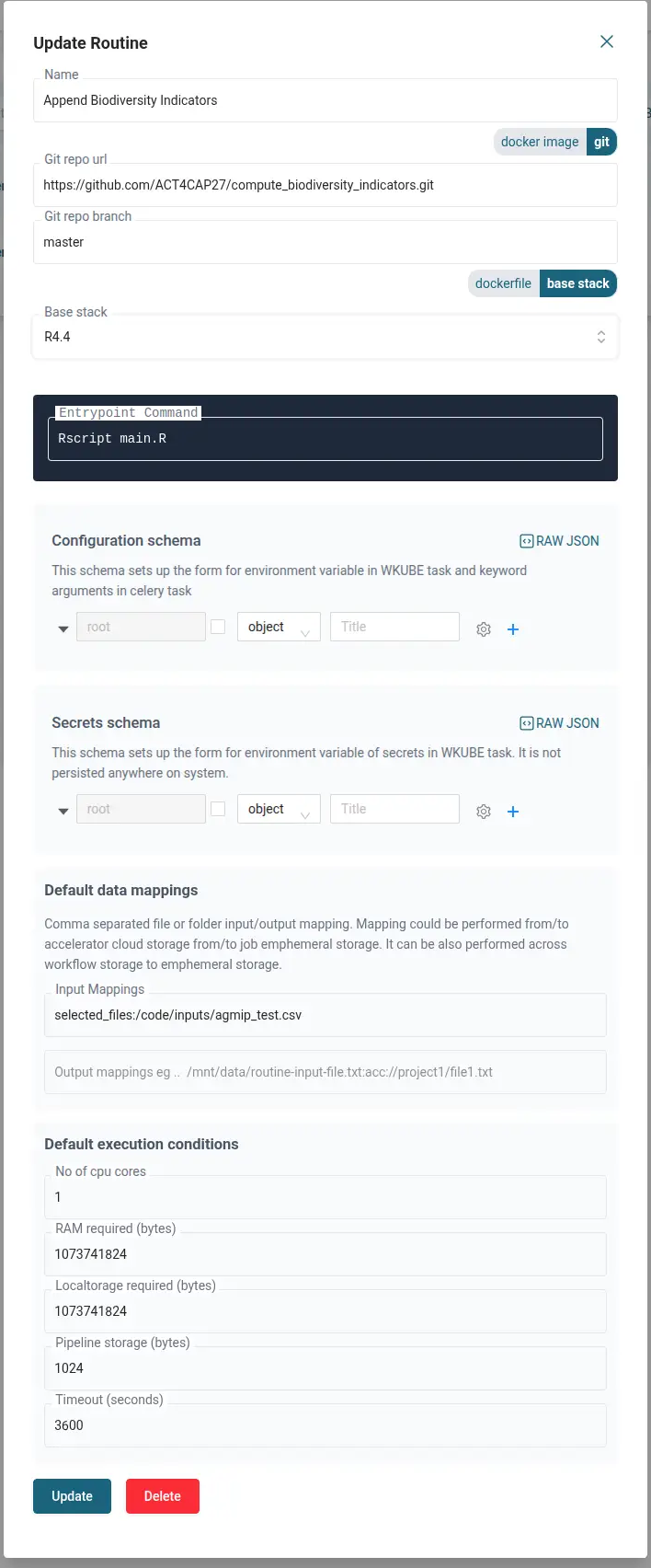
Instead of writing wkube.py, the GUI provides a form to define a routine as a reusable routine entity.
🧾 Metadata Form
When creating a new routine:
- You fill out a structured form that mirrors all the required
WKubeTaskfields:name,base_stack,command, etc.
- These fields are one-to-one mapped with the programmatic API.
🛠️ conf Configuration via JSON Schema
- A separate section of the form is generated dynamically using a JSON Schema.
- This allows you to define any number of additional configuration parameters.
- When the form is filled, values are converted into a
confdictionary — just like in code — and passed as * environment variables* to the container.
🔄 Explicit Data Mappings
The GUI provides explicit input fields for:
input_mappingsoutput_mappings
These support semicolon-separated mapping syntax and help users wire up storage paths easily.
📸 Routine Creation Form
🚀 Launching a Routine in the GUI
Once a routine entity is saved, you can launch it in multiple ways:
Option 1: From the Routine List
- Navigate to the Routines section.
- Click the “Run” button on any saved routine.
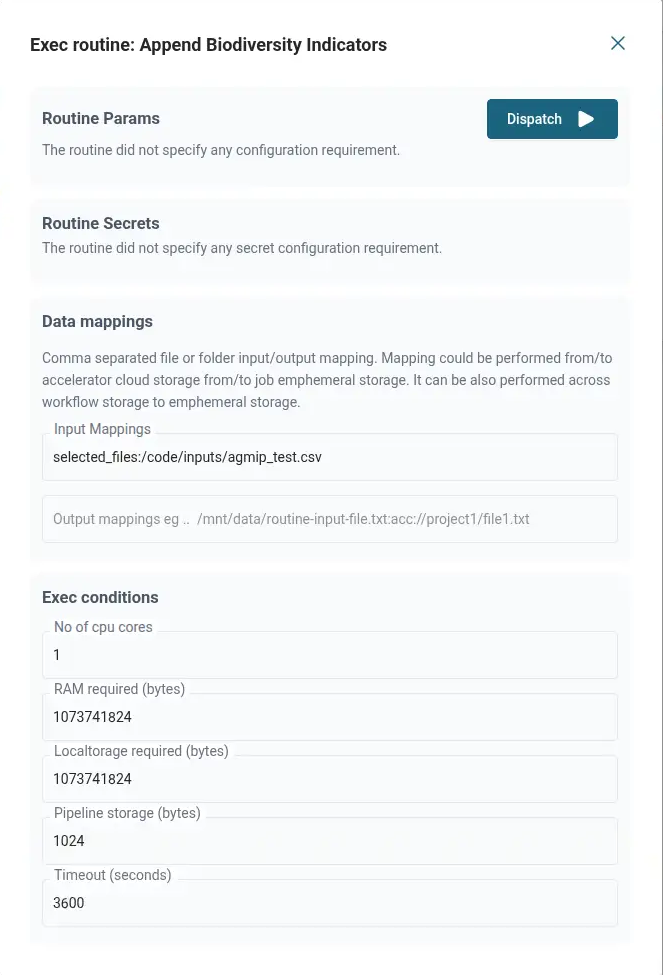
- A dispatch form appears:
- Fields from the metadata and
confare editable. - You can override mappings and configuration at launch time.
- Fields from the metadata and
Option 2: From the File Explorer
- Select one or more files or folders.
- Right-click and choose “Run with Routine”.
- This injects special mapping keys:
selected_filesselected_folders
- These are resolved into full mappings automatically when the job runs.
📸 Routine Launch Form
🧩 Visual Jobflow Builder
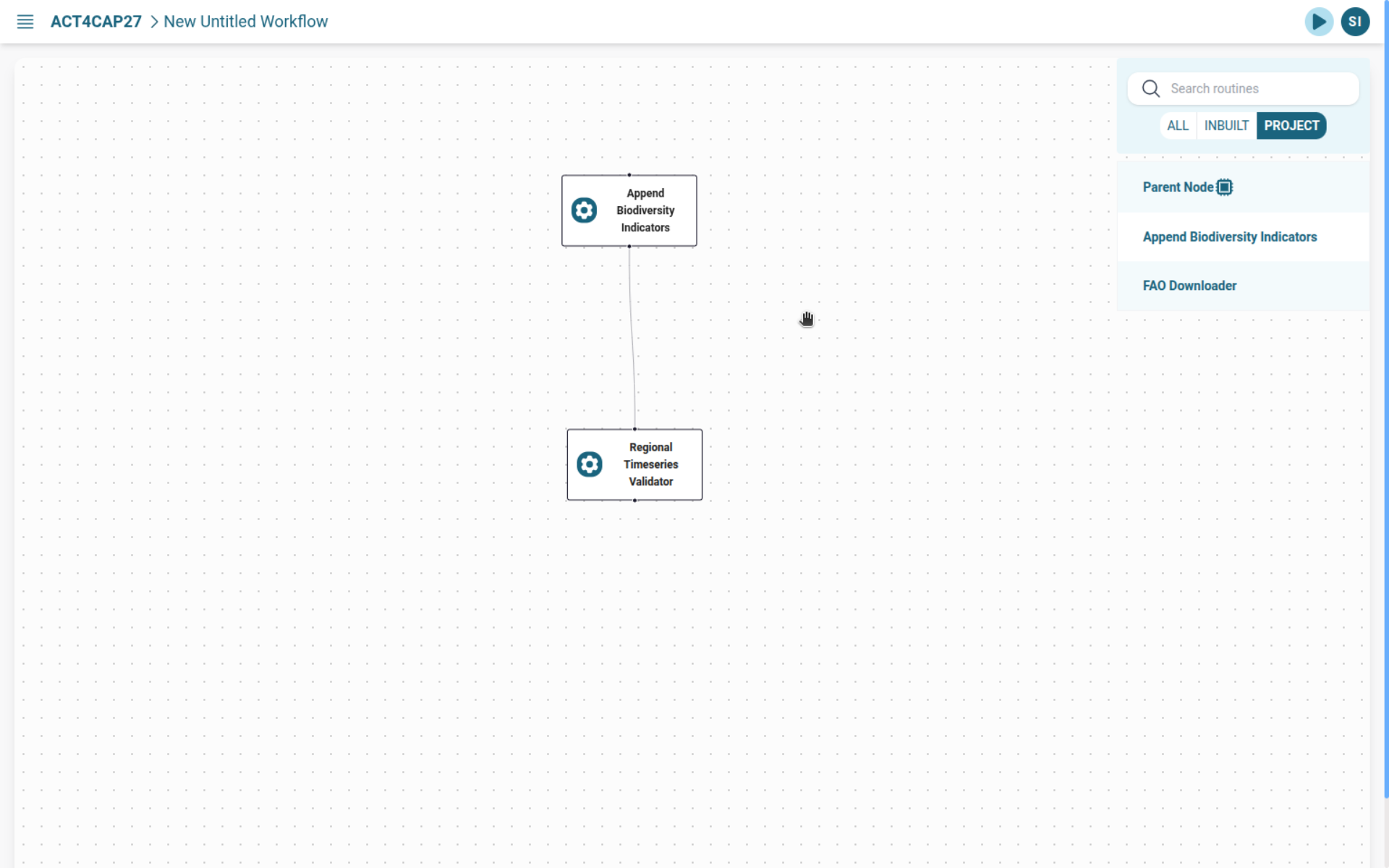
The platform provides a graphical interface for designing and launching Jobflows.
🎛️ Jobflow Construction
- Drag and drop previously saved routine entities into a visual canvas.
- Connect them with:
- Child relationships
- Callback relationships
This builds an acyclic execution graph where tasks can be executed in sequence, in parallel, or conditionally.
🧱 Aggregator (Spanner) Nodes
- You can add a dummy aggregator node to group child routines.
- These spanners don’t run code — they are used for structuring or parallelizing flows.
🔁 Parallel Execution with Multipliers
- Parallelism is controlled by a multiplier parameter (typically a CSV file).
- This file can be:
- Mapped manually in the flow configuration
- Or more conveniently: selected in the file explorer at launch time
When launching from the file explorer, the selected file is automatically used as the multiplier source for spanner/aggregator nodes.
📸 Jobflow Creation View
✅ Summary
| Feature | Code-Based | GUI-Based |
|---|---|---|
| Define Routine | wkube.py and WKubeTask | Form-based entity creation |
Configure conf | Python dict | JSON schema–driven form |
| Data Mappings | input_mappings, output_mappings | Explicit fields in form |
| Launch Routine | accli dispatch | Run from Routine list or File Explorer |
| Build Jobflow | Define via task graph in code | Drag-and-drop interface |
| Control Parallelism | Manual mapping | File-based multiplier at launch |
| Spanner/Aggregator Support | Holder WKubeTask() | Dummy node in Jobflow builder |
GUI workflows provide a user-friendly, modular, and reusable way to define and orchestrate jobs, especially helpful for less code-heavy users or collaborative teams.