
🎒 Getting Started / Prerequisites
Before diving into this workflow, it’s highly recommended that users familiarize themselves with some foundational concepts and tools used across the Accelerator platform. The following resources provide essential background that will help you understand routines, data mappings, base stacks, and how reusable components fit into larger workflows.
These materials are especially useful if you are new to the Accelerator ecosystem or want a refresher on how different elements interact. Being comfortable with these topics will help you confidently follow this use case and adapt it to your own data and modeling needs.
We suggest reviewing the following pages in order:
Getting Started with Accelerator
Introduction to the Accelerator platform, its architecture, and user interface.Routine Introduction
Explains what routines are, their role in automating scientific workflows, and how they are configured and executed.Routine Basics
Covers essential steps in setting up, configuring, and running a routine.Routine Base Stacks
Describes the concept of base stacks, including language environments and dependencies required by routines.Routine Data Mapping
Illustrates how to map input and output data between file systems, object stores, and mounted volumes.Common Inbuilt Routines
Provides a catalog of prebuilt, reusable routines available within the platform.
📥 Use Case 1: Raw FAOSTAT Data to Model Input
This guide walks through a common scientific workflow: preparing FAOSTAT data for use as structured input in models like GLOBIOM and CAPRI. The process involves two main routines and demonstrates both standalone and jobflow-based execution on the Accelerator platform.
🎯 Objective
This guide walks through a complete workflow for transforming raw FAOSTAT datasets into model-ready GDX files, commonly used in scientific modeling frameworks like GLOBIOM and CAPRI.
You will learn how to:
- Download raw FAOSTAT datasets programmatically
- Convert raw CSV data into GDX format for model consumption
- Execute routines either independently or as part of a pipeline
- Enable reproducibility and traceability through optional output versioning
🛠️ Encountering Issues?
If you run into obstacles during execution—whether with the platform or the routines—here are two key paths for troubleshooting and support:
🔧 Accelerator Platform Issues
If you suspect the issue is with the Accelerator platform itself (e.g., UI glitches, job dispatch errors, authentication problems), please check the Accelerator GitHub Issues page.
- Search to see if others have already reported similar problems.
- If not, feel free to open a new issue with detailed steps to reproduce the problem.
📦 Routine-Specific Issues
If the error seems specific to one of the routines (e.g., data not downloading, script failure, incorrect output):
- Visit the GitHub repository for the relevant routine:
- Check the Issues section to see if others have faced a similar problem.
- If your issue is new, open a ticket with your configuration, logs, and any observed behavior.
Engaging with the existing community discussion often helps identify workarounds or quick fixes. Collaboration strengthens these tools over time.
🚀 Execution Patterns
A. Running Routines Individually with GUI
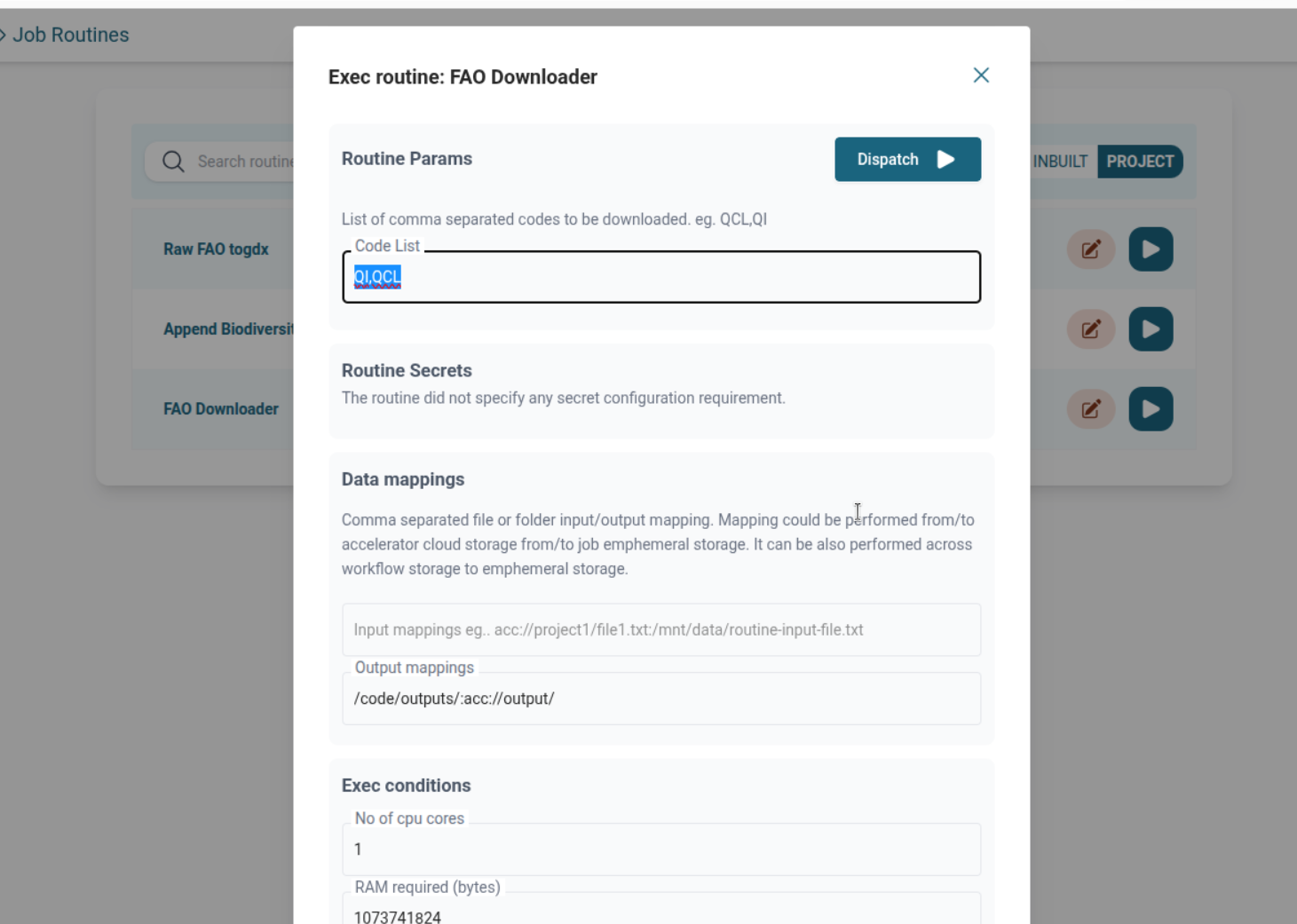
FAO Downloader Routine
- Run from Routines Page
- Provide
code_listin form - Map output to any target location (acc://, mounted volume, etc.)
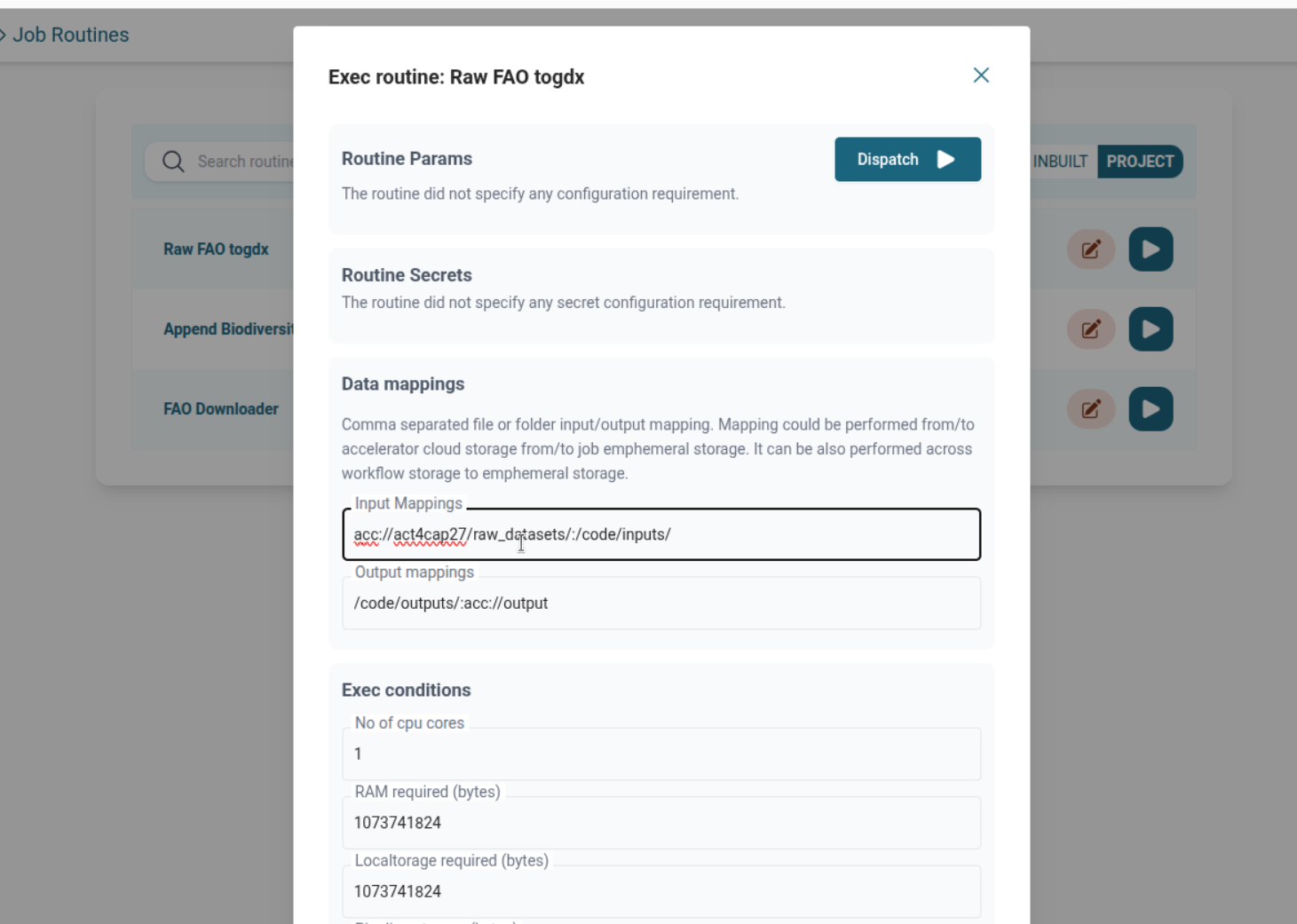
FAO to GDX Converter Routine
- Run from Routine List Page
- Map input from any source (e.g., acc://, mounted volume)
- Provide additional config if needed
- For further details on how this routine works internally—including its expected input structure and output behavior—see the README in the FAO to GDX Converter repository
B. Running as a Jobflow with GUI (Jobflow)
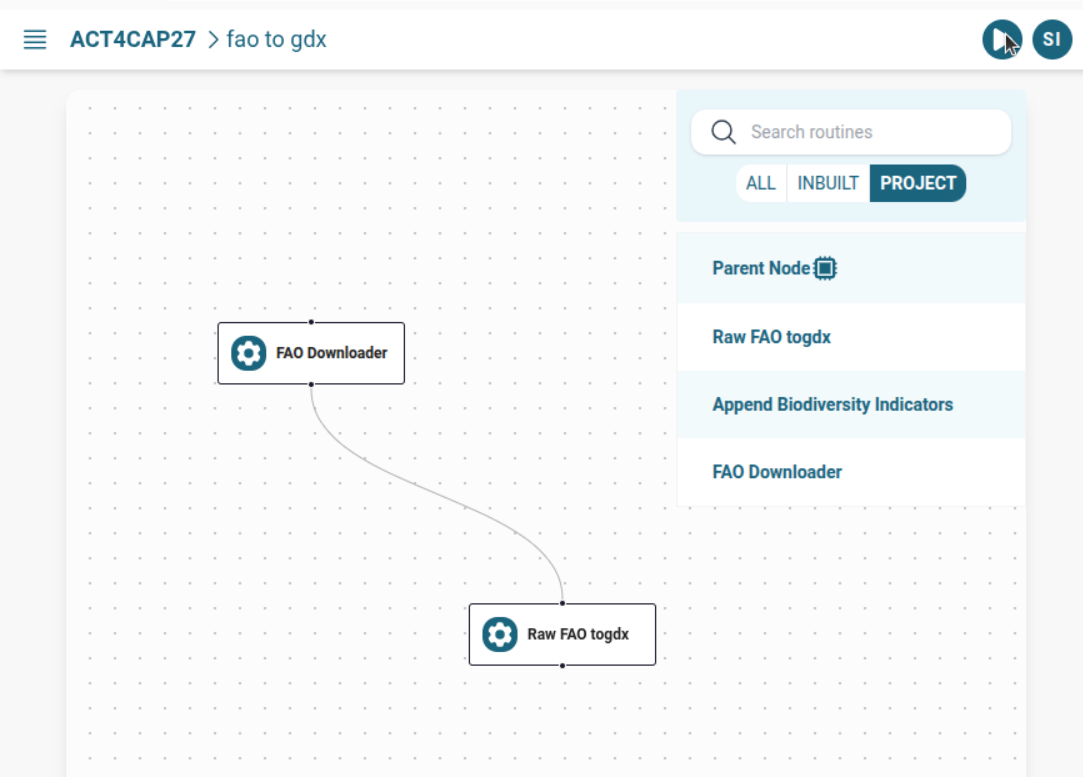
When used together:
- FAO Downloader → FAO to GDX Converter connected via
add_child() /mnt/tmpused as intermediate mounted volume
Run from Jobflow List Page:
🧑💻 Running from local computer without using GUI
Before you proceed with defining or dispatching routines programmatically, it's helpful to ensure you're familiar with how routines are structured and configured on the Accelerator platform.
👉 If you haven’t already, take a moment to review the Routine Basics Guide for an overview of key concepts like WKubeTask, configuration options, and best practices for routine authoring.
1️⃣ Individual FAO Downloader Routine wkube.py
from accli import WKubeTask

fao_downloader = WKubeTask(
    name="FAO Downloader",
    repo_url="https://github.com/ACT4CAP27/faodata.git",
    repo_branch="master",
    base_stack="R4_4",
    command="Rscript main.R",
    required_cores=4,
    required_ram=1024 * 1024 * 1024*10,
    required_storage_local=1024 * 1024 * 1024*10,
    required_storage_workflow=1024 * 1024 * 1024*10,
    timeout=3600,
    conf={
        "code_list": "QCL,FS",
        "output_mappings": "/code/outputs/:acc://act4cap27/fao-outputs/"
    }
)
🚀 Dispatching the Individual FAO Downloader Routine from Terminal
accli loginFollow the on-screen instructions to authenticate with the platform.
➡️ Install & Get Started with accli
accli dispatch act4cap27 fao_downloader1️⃣ Individual Raw FAO to .gdx Routine wkube.py
from accli import WKubeTask

to_gdx = WKubeTask(
    name="FAO to GDX Converter",
    repo_url="https://github.com/ACT4CAP27/fao_to_gdx.git",
    repo_branch="master",
    base_stack="GAMS40_1__R4_0",
    command="Rscript main.R",
    required_cores=4,
    required_ram=1024 * 1024 * 1024*10,
    required_storage_local=1024 * 1024 * 1024*10,
    required_storage_workflow=1024 * 1024 * 1024*10,
    timeout=3600,
    conf={
        "input_mappings": "acc://act4cap27/FAODATA/:/code/inputs/",
        "output_mappings": "/code/outputs/:acc://act4cap27/fao-outputs/"
    }
)
🚀 Dispatching the Individual Raw FAO to .gdx Routine from Terminal
accli loginFollow the on-screen instructions to authenticate with the platform.
➡️ Install & Get Started with accli
accli dispatch act4cap27 to_gdx2️⃣ Jobflow (FAO Downloader → FAO to GDX Converter)
from accli import WKubeTask

# FAO Downloader
fao_gdx_flow = WKubeTask(
    name="FAO Downloader to gdx",
    repo_url="https://github.com/ACT4CAP27/faodata.git",
    repo_branch="master",
    base_stack="R4_4",
    command="Rscript main.R",
    required_cores=4,
    required_ram=1024 * 1024 * 1024*10,
    required_storage_local=1024 * 1024 * 1024*10,
    required_storage_workflow=1024 * 1024 * 1024*10,
    timeout=3600,
    conf={
        "code_list": "QCL,FS",
        "output_mappings": "/code/outputs/:/mnt/tmp/fao_data/"
    }
)

# FAO to GDX Converter
fao_to_gdx = WKubeTask(
    name="FAO to GDX Converter",
    repo_url="https://github.com/ACT4CAP27/fao_to_gdx.git",
    repo_branch="master",
    base_stack="GAMS40_1__R4_0",
    command="Rscript main.R",
    required_cores=4,
    required_ram=1024 * 1024 * 1024*10,
    required_storage_local=1024 * 1024 * 1024*10,
    required_storage_workflow=1024 * 1024 * 1024*10,
    timeout=3600,
    conf={
        "input_mappings": "/mnt/tmp/fao_data/:/code/inputs/",
        "output_mappings": "/code/outputs/:acc://act4cap27/gdx-outputs/"
    }
)

# Connect Jobflow
fao_downloader.add_callback(fao_to_gdx)
🚀 Dispatching Jobflow (FAO Downloader → FAO to GDX Converter) from Terminal
With wkube.py defined and your project ready, you can submit your jobflow from the terminal using the accli tool.
Step 1: Log In
➡️ Install & Get Started with accli
accli loginFollow the on-screen instructions to authenticate with the platform.
Step 2: Dispatch Your Jobflow
accli dispatch act4cap27 fao_gdx_flow🔍 Execution Context from GUI
| Scenario | Where to Run |
|---|---|
| Routine requires file input | File Explorer → Run Routine |
| Routine does not require file input | Routine List Page |
| Jobflow with no file selection | Jobflow List Page |
🗂️ Versioning Outputs
If the raw FAO data or GDX files are significant:
- Use DVC-powered Git Push routine to version and store them
- Enables:
- Reproducibility
- Auditability
- Collaboration with clear dataset lineage
📖 See: Inbuilt Routines Guide
🔗 Related Topics
✅ Summary
This use case demonstrates a practical example of using Accelerator to:
- Ingest external FAOSTAT data
- Convert it into structured model input
- Support flexible execution (standalone or jobflow)
- Enable reproducibility via versioning
Such patterns are the foundation for scalable, trustworthy scientific computing on Accelerator.